
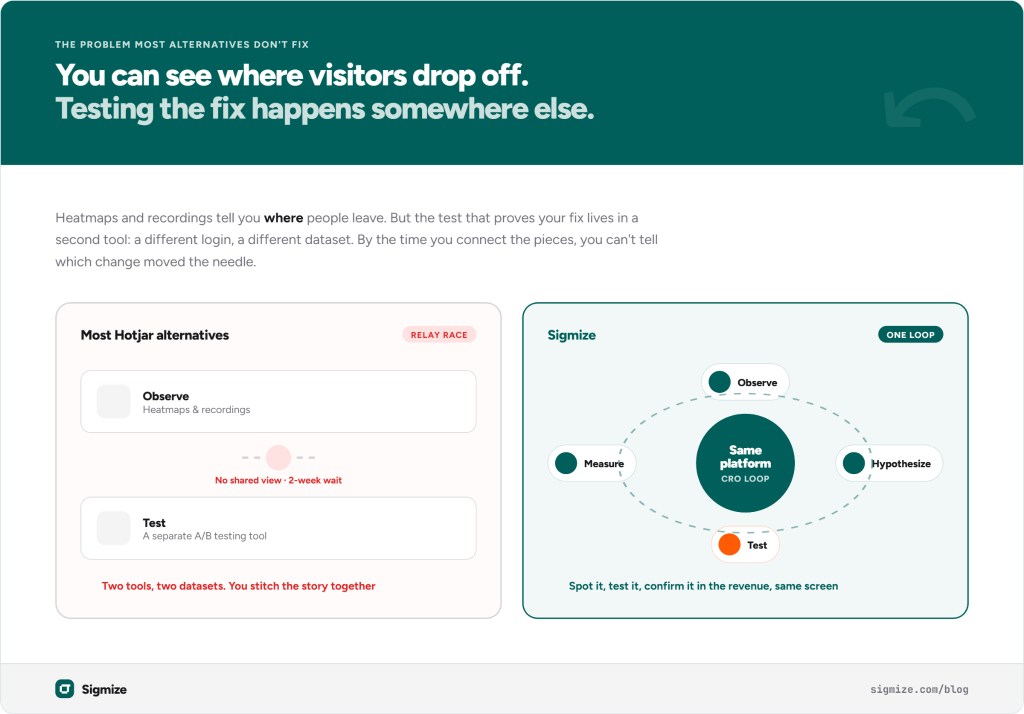
You already know where visitors are dropping off. You have watched the session recordings, studied the heatmaps, and formed a theory about what needs to change. The problem is that Hotjar stops there. Testing whether your theory is right happens somewhere else, in a different tool, a different login, a different dataset. By the time you have connected the pieces, you are not sure which change made the difference.
Most Hotjar alternatives have the same problem. They replace the behavioral analytics layer but do not add A/B testing, so your workflow stays split across tools. This guide covers the best Hotjar alternatives for 2026, including the free and lower-cost options worth knowing, and it makes a case the other comparisons miss: the alternative that saves you the most is the one that lets you observe and test in the same place.
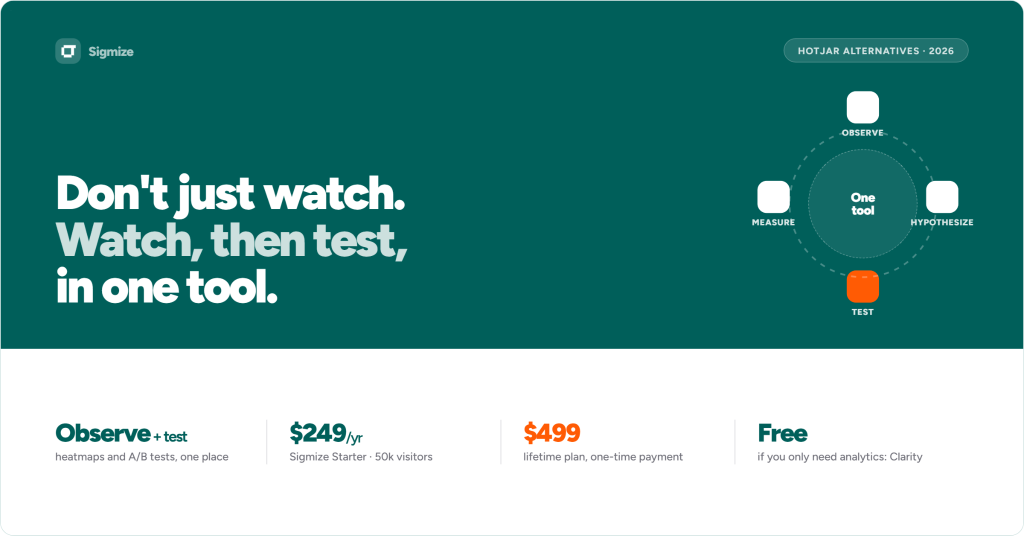
The short answer: The best Hotjar alternative for WordPress and WooCommerce sites is Sigmize. It replaces Hotjar’s heatmaps and session recordings and adds A/B testing and revenue tracking, so you can see where visitors drop off and immediately test whether a change improves it, without switching platforms. Pricing starts at $249/year, with a Lifetime plan at $499. If you only need behavioral analytics and nothing else, Microsoft Clarity is free and genuinely good.
Why Are People Looking for Hotjar Alternatives Right Now?
Three things are driving the search in 2026, and they are different from the usual “too expensive” complaint.
The first is the Contentsquare acquisition. Hotjar was acquired by Contentsquare, an enterprise analytics platform. Post-acquisition, Hotjar’s pricing is increasingly handled through Contentsquare’s site and enterprise-oriented flows, especially for higher tiers. Legacy plans still work, but the product direction is moving toward large enterprise customers. If you run a WordPress store or a small agency, that trajectory matters.
The second is the pricing structure. Hotjar is not one product. It is three separate modules: Observe for heatmaps and session recordings, Ask for surveys, and Engage for user interviews, each priced independently. Observe Plus runs around €32/month (~$35) on annual billing for roughly 100 daily sessions. Add surveys on Ask and you are over $80/month before you have run a single A/B test, which Hotjar does not include at any tier.
The third is that missing feature. Hotjar does not include built-in A/B testing. It can monitor experiments running in other tools through heatmaps and recordings, but the experimentation itself lives elsewhere. If you want to test whether a new headline or a redesigned checkout improves conversion, you need a separate tool like Optimizely, A/B Tasty, etc on top of Hotjar. That gap is the thing most alternatives fail to address.
What Is the Real Problem With Most Hotjar Alternatives?
Most alternatives replace the behavioral analytics layer and stop there. Microsoft Clarity does heatmaps and session recordings for free. Smartlook does the same with more filters. Mida and Lucky Orange offer similar features at lower price points. Each is a reasonable answer if behavioral analytics is all you need. None of them solves the workflow problem.
Here is the problem. You install Hotjar, or any alternative. You watch session recordings. You find that 60% of visitors on your pricing page scroll to the second plan and leave without clicking anything. You have a hypothesis, maybe the price anchoring is wrong or the CTA copy is not landing. Now what?
You open a different tool, set up an A/B test there, wait two weeks, and go back to Hotjar to see if the heatmap changed. You cannot compare results across platforms. You are stitching together a picture from two separate data sources, and the picture is never quite complete.
This is the observe-test gap, and it is where most Hotjar alternatives leave you exactly where Hotjar did.
What Changes When Analytics and A/B Testing Live in One Tool?
When you can see the heatmap and run the test in the same platform, the workflow becomes a loop instead of a relay race.
You see the drop-off point on your checkout page. You create a variant, maybe a different CTA, a simplified form, or a repositioned trust badge. Sigmize splits traffic between the original and the variant, tracks conversions and revenue per variant, and shows you whether visitor behaviour actually changed. When the test reaches statistical significance, you apply the winner and look at the new heatmap.
That loop of observe, hypothesize, test, and measure is the core of conversion rate optimization. Sigmize is built around it, which is why it is a different kind of Hotjar alternative rather than just a cheaper one.
Sigmize runs experiments and processing in a cloud backend. The WordPress plugin adds a lightweight JavaScript snippet, but the heavy lifting happens off your server, so site overhead stays minimal. The full plan breakdown is on the pricing page: Starter at $249/year for 50,000 visitors, Pro at $449/year for 400,000 visitors, and a Lifetime plan at $499 for 120,000 visitors per year.
What Does the Loop Look Like in Practice?
Take a WooCommerce store selling one flagship product. Traffic is healthy, but the product page converts lower than it should.
The owner opens the heatmap. Most visitors scroll past the hero, slow down at the photo gallery, and stall right before the add-to-cart button. The scroll map shows the problem: a block of reviews and shipping information sits above the button, and most people never scroll far enough to reach it. The session recordings back it up. Visitors scroll, hesitate, scroll back up, and leave.
The hypothesis writes itself. The button is buried, so move it above the reviews and put the decision in front of people before they lose patience.
In Sigmize, the owner builds a variant of the product page with the button repositioned. Traffic splits between the two versions. Over the next two weeks, Sigmize tracks add-to-cart clicks, completed purchases, and revenue for each one. The variant pulls ahead, and once the result reaches statistical significance, the owner sets it live.
Then the loop closes. The heatmap on the winning page shows visitors reaching the button far earlier, so the hunch from the recordings is now confirmed by a test and visible in the revenue. That whole sequence, from spotting the problem to proving the fix, happened in one tool. With Hotjar, the first half would have lived in one platform and the test in another, with no shared view of whether behaviour actually changed.
What the Visitor Experiences
A test only works if the visitor never notices it is running.
When someone lands on a page in a Sigmize experiment, they see one version cleanly, with no flash of the original before the variant loads. They keep seeing that same version on return visits, because the assignment stays consistent. Nothing feels slower, because the processing runs in Sigmize’s cloud rather than on your server. From the visitor’s side it is just your website, and the test stays invisible, which is exactly what you want. A test the visitor can see is a test that changes the behaviour you are trying to measure.
What Are the Best Hotjar Alternatives?
Not every alternative fits every situation. Here is an honest look at the main options.
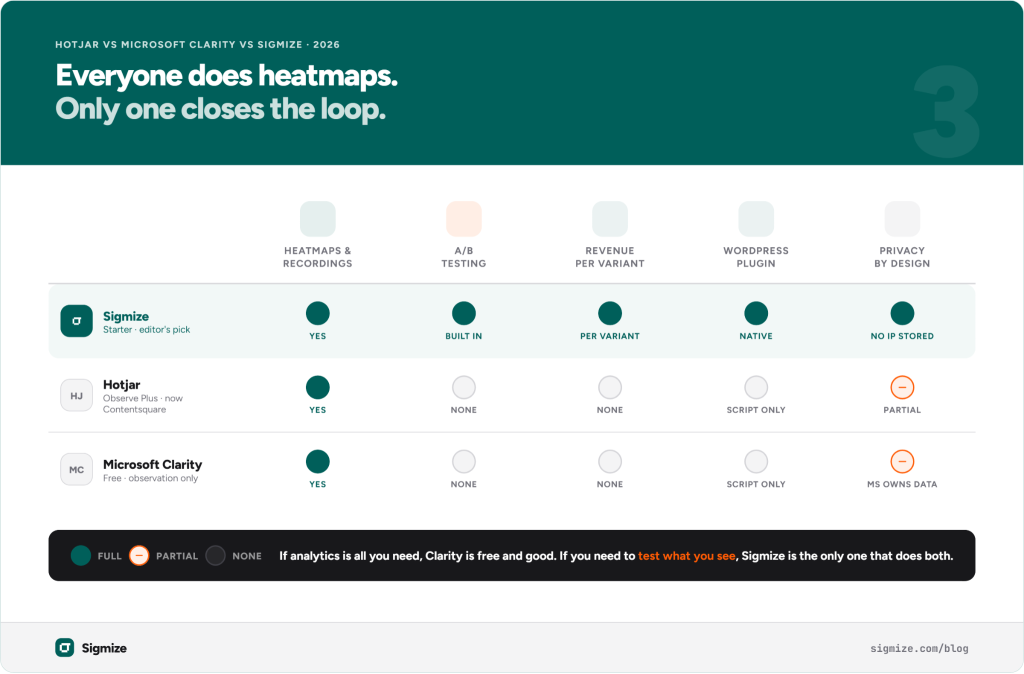
Sigmize is the only tool here that does heatmaps, session recordings, and A/B testing in one place, so you can spot where visitors drop off and test the fix without paying for a second tool. Built for WordPress, with a one-time Lifetime plan at $499 instead of the ongoing subscriptions VWO, Optimizely, and AB Tasty charge.
Microsoft Clarity is free, with no session limits, no paid upgrade path, and no traffic caps. It does heatmaps and session recordings well. If you only need behavioral analytics and have no A/B testing plans, it is hard to argue against at zero cost. The tradeoff is that Microsoft owns your data and there is no testing capability. Our comparison of CRO tools for WordPress goes deeper on where Clarity fits.
Smartlook is strong on session recordings with event-based filtering, and a good fit for mobile apps and web products where you track specific interactions. Third-party listings put the Business plan at around $55/month for meaningful session volumes, though Smartlook’s site now uses sales-led pricing without published tiers. No A/B testing.
Lucky Orange includes light conversion tools alongside heatmaps and recordings, with a WordPress plugin. It does not have a dedicated A/B testing system but does include form analytics and live chat. Paid plans start in roughly the $20 to $40/month range depending on traffic.
Mida is a lightweight heatmap and session recording tool built for WordPress, simpler than Hotjar, with pricing in the sub-$50/month range. Check mida-app.io for current figures as plans have changed recently. No A/B testing.
If behavioral analytics alone is enough, Microsoft Clarity is the obvious first stop. If you want behavioral data plus A/B testing in one place, especially on WordPress, Sigmize is the only tool here that combines both.
Hotjar vs Sigmize: A Direct Comparison
| Feature | Hotjar (Observe Plus) | Microsoft Clarity | Sigmize (Starter) |
|---|---|---|---|
| Heatmaps | Yes | Yes | Yes |
| Session recordings | Yes | Yes | Yes |
| Session filters and sorting | Limited | Basic | Yes |
| A/B testing | No | No | Yes |
| Element testing | No | No | Yes |
| Revenue tracking per variant | No | No | Yes |
| WordPress-native plugin | No | No | Yes |
| Privacy, no IP storage | Partial | Limited | Yes, privacy by design |
| Pricing (annual) | Free | From $249/yr | |
| Lifetime option | No | n/a | Yes, $499 |
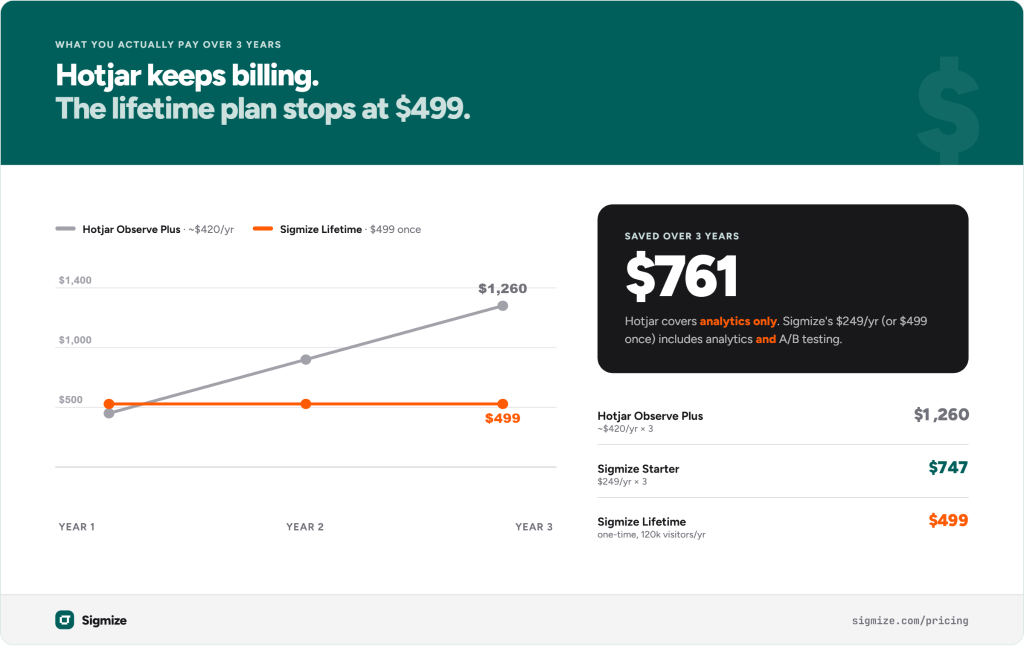
The pricing comparison deserves a closer look. Hotjar Observe Plus runs around €32/month (~$35) on annual billing, roughly $420/year. Three years of that is around $1,260, and that is before the Contentsquare migration resolves. Sigmize’s Lifetime plan is a one-time $499 covering 120,000 visitors per year, indefinitely. For a site with consistent traffic, the math resolves quickly. More importantly, Hotjar’s $420/year covers behavioral data only, while Sigmize’s $249/year includes behavioral data and A/B testing on a platform built for WordPress.
Who Should Still Use Hotjar?
Hotjar, now part of Contentsquare, is the right choice for larger teams in non-WordPress environments that need deep integration with enterprise analytics stacks. If your site runs on a custom platform, your team leans heavily on Salesforce or Mixpanel, and you need user interview recruiting through Hotjar Engage, the full Contentsquare suite has capabilities Sigmize does not aim to match.
For WordPress and WooCommerce sites that want to understand visitor behaviour and improve conversion rates, Hotjar’s complexity and per-module pricing work against it. Sigmize does less, but what it does, it does as a complete loop rather than a starting point for a stack of tools.
The Lifetime plan is currently available at $499, a one-time payment with no ongoing subscription. If your traffic sits within the 120,000 visitors per year tier, it removes the pricing math entirely.
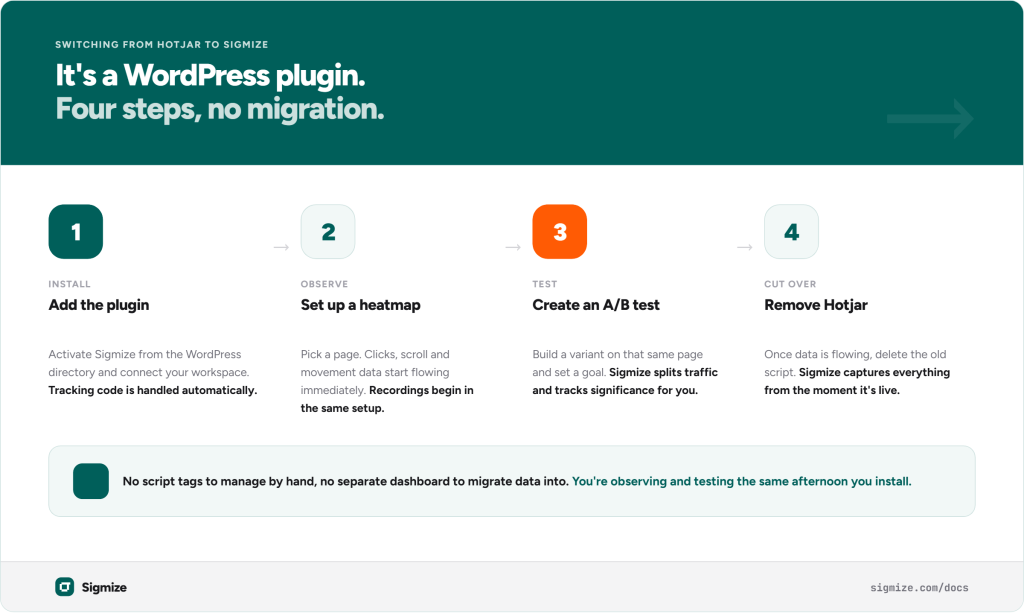
How Do You Switch From Hotjar to Sigmize?
The switch is straightforward because Sigmize installs as a WordPress plugin. There is no script tag to manage manually and no separate dashboard to migrate data into.
Step 1: Install the Sigmize plugin. Install and activate the plugin from the WordPress plugin directory, then connect it to your Sigmize workspace. The plugin handles all tracking code automatically.
Step 2: Set up your first heatmap. Select the page you want to track. Sigmize starts collecting click, scroll, and movement data immediately, and session recordings begin in the same setup with no separate configuration.
Step 3: Create your first A/B test. In your Sigmize workspace, create an experiment on the same page, set up a variant, and define a conversion goal such as a form submission, a purchase, or a page visit. Sigmize handles traffic splitting and statistical tracking automatically.
Step 4: Remove Hotjar. Once Sigmize is running and you have confirmed data is flowing, deactivate and delete the Hotjar script. Sigmize captures everything from the moment it is live.
The Sigmize documentation covers each step in detail.
One Thing Worth Knowing Before You Decide
Hotjar’s Ask module, its surveys and on-page polls, does not have an equivalent in Sigmize. If on-site surveys are central to your qualitative research, that is a real gap. Sigmize is built for behavioral data and A/B testing, not survey collection or user interviews.
For most WordPress store owners and marketers, that is not a problem. Behavioral analytics and testing are the features they actually use, and surveys tend to come later if at all. But if qualitative research is core to how your team makes decisions, it is worth knowing upfront.
Start your Sigmize trial or view the full pricing breakdown to see which plan fits.
Frequently Asked Questions
Is there a free Hotjar alternative? Yes. Microsoft Clarity is free with no session limits and no paid tier. It covers heatmaps and session recordings well. The tradeoff is that it has no A/B testing, and Microsoft owns the data.
Does Sigmize do surveys like Hotjar? No. Sigmize focuses on behavioral analytics and A/B testing. Hotjar’s Ask module for surveys and polls does not have a Sigmize equivalent. If surveys are central to your research, that is worth factoring in.
Can Sigmize run heatmaps and A/B tests at the same time? Yes. This is the main reason to choose it over Hotjar. You can see where visitors drop off on a page and immediately run a test to fix it, all in one platform, then compare the new behaviour against the original.
Is Sigmize GDPR compliant? Yes. Sigmize is built privacy-first, with no IP address storage, no form input capture, and no persistent identifiers, which supports GDPR compliance out of the box.
Recommended Articles
What Is Sigmize? The Real Story, Brand, And The A/B Testing Platform
Sigmize – A/B Testing For WordPress And WooCommerce That Actually Works